
Introduction
Learn how to set up webhooks for your project.
A webhook is a callback function that notifies a third-party application about a specific event. It is an HTTP endpoint that listens for incoming HTTP POST requests triggered by events, allowing the receiving application to react accordingly.
Webhooks configuration are available in all plans.
Configure Webhooks
Access Webhooks Settings
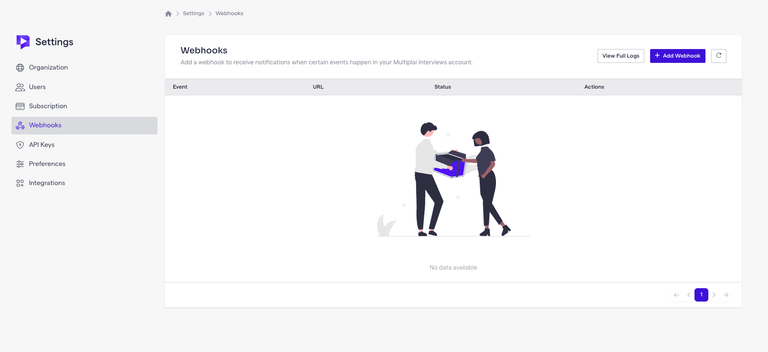
Navigate to Settings ➞ Webhooks in your organization's settings.
Create a New Webhook
Click the Add Webhook button to initiate the process.
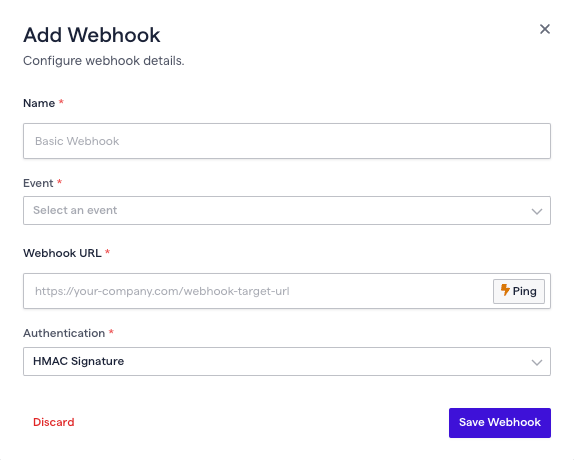
After clicking the button, you will be prompted to enter the following details:
Webhook Events
Select the events you want your webhook to listen to:
| Event | Description |
|---|---|
| JobPost.Application.Submitted | Listens when a candidate submits an application. |
| JobPost.Application.Completed | Listens when a candidate completes the interview process. |
| JobPost.Application.Status | Listens when the status of an application changes. |
| JobPost.Publish.Status | Listens when the status of a job post is published. |
| JobPost.Deleted | Listens when a job post is deleted. |
Webhook URL
Enter the URL of the endpoint that will receive the webhook payload.
Webhook Security
Our team will provide the secret key, which must be treated as confidential information.
Our webhooks use a secure signature called HMAC-SHA256. It is sent in a header named ir-signature. This helps keep the request safe and makes sure it's real. You should always verify this signature before processing the request.